
Kimi K1.5 was an important earlier-generation model in Moonshot AI’s Kimi family, introduced in January 2025 as a multimodal reasoning model rather than a current default backbone. In its official research release, Moonshot described K1.5 as an “o1-level multi-modal model,” highlighting strong short-CoT performance and long-CoT reasoning across tasks such as math, coding, and multimodal evaluation, with long-context reinforcement learning scaled to 128K context. For current product, multimodal, and platform guidance, readers should be directed to Kimi K2.5, which Moonshot now presents as its most versatile and up-to-date model.
Kimi K1.5 should therefore be presented as a historical 2025 model page: important in Moonshot’s development, but no longer the main model readers should treat as the present-day center of the Kimi ecosystem. For developers, Moonshot’s current official API documentation emphasizes the newer Kimi platform and its latest model lineup, especially Kimi K2.5, which supports multimodal input, thinking and non-thinking modes, and agent-style workflows through the Kimi Open Platform. Moonshot has also expanded beyond K1.5 with newer systems such as Kimi-Researcher, an autonomous model built for multi-step planning, reasoning, and tool use.
Technical Overview: Architecture, Context Window, and Performance
From a technical standpoint, Kimi K1.5 is a transformer-based, dense large language model trained with advanced reinforcement learning techniques. It features a multimodal architecture, meaning it was trained to understand both text and visual inputs, unlike text-only models.
This allows Kimi to jointly reason over text and images (for example, analyzing a chart or reading code screenshots alongside text) and even handle mixed inputs like image-to-code tasks.
Under the hood, Kimi K1.5’s training involved innovative reinforcement learning (RL) methods: the model learned through chain-of-thought reasoning with a reward system, enabling it to plan, reflect, and correct its answers.
The following diagram illustrates Kimi K1.5’s reinforcement learning framework, showing how rollout workers, reward models, and partial rollouts contribute to efficient long-CoT training.
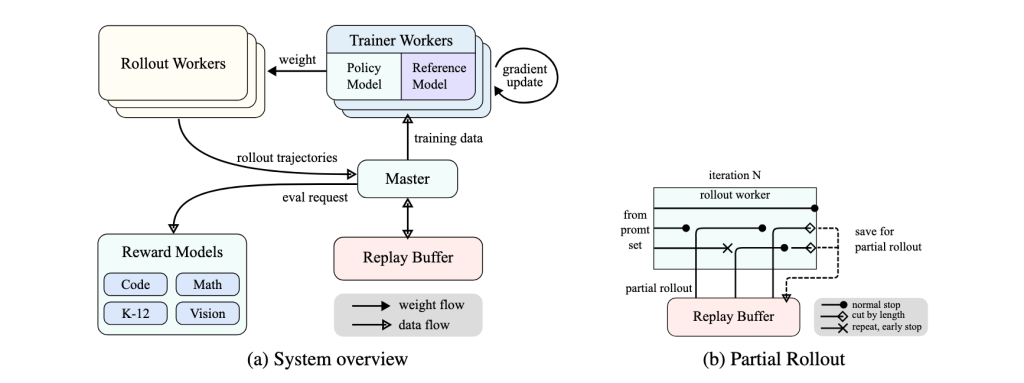
The Moonshot team employed techniques like online mirror descent for policy optimization and “partial rollouts” (reusing large parts of previous reasoning trajectories) to efficiently train the model on long sequences.
This RL-enhanced approach helped Kimi develop strong problem-solving skills without relying on extremely complex planners – instead, Kimi can internally simulate a search through possible reasoning steps thanks to its long context capability.
One of Kimi K1.5’s standout technical features is its exceptionally large context window of 128,000 tokens. This context size is among the longest of any LLM, equating to roughly 100,000+ characters (enough to input entire books or codebases in one prompt).
In practical terms, this means Kimi can ingest and analyze massive documents or multiple files at once without losing track of earlier content. For example, it can read and reason about a lengthy legal contract or an entire repository’s code in one session, providing coherent, context-aware responses throughout.
This ultra-long context window makes Kimi ideal for tasks like reviewing extensive software project documentation, summarizing lengthy research papers, or debugging across a large codebase in one go. Such capability places K1.5 at the forefront of long-context AI applications.
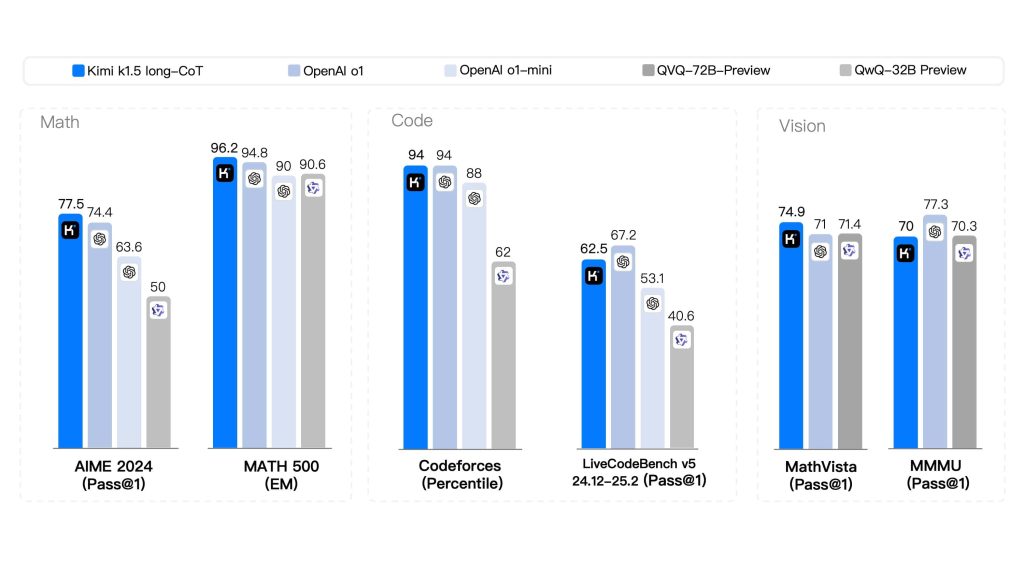
The following benchmarks demonstrate Kimi K1.5’s long-CoT performance compared to leading AI models across Math, Code, and Vision tasks.
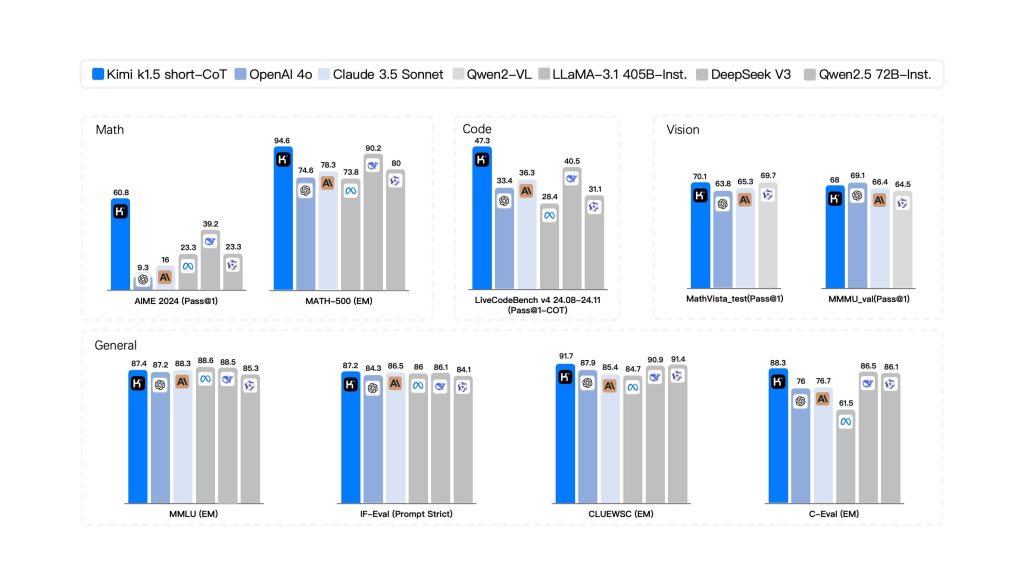
In terms of model size (parameters), Kimi K1.5 operates at an immense scale typical of frontier models. While Moonshot hasn’t publicly disclosed exact numbers in detail, independent reports estimate on the order of hundreds of billions of parameters – one analysis lists Kimi K1.5 at around 500 billion parameters.
This staggering model size (half a trillion weights) would make K1.5 one of the largest dense LLMs ever developed. The huge parameter count, combined with its long-context training, contributes to the model’s strong performance on complex reasoning and coding tasks.
However, it also means Kimi K1.5 is computationally heavy. In terms of speed and memory usage, the model prioritizes thorough reasoning and stability over sheer response speed.
In practice, Kimi delivers consistent performance across various tasks, but generating very long outputs (due to long CoT reasoning or large contexts) can be slower compared to smaller models. The high token count and parameter size also imply significant memory requirements.
Kimi K1.5 runs on Moonshot’s cloud infrastructure because hosting it locally is impractical for most developers – for comparison, the next-gen Kimi K2 (a 1 trillion parameter MoE model) requires multiple high-end GPUs or a powerful cluster for local deployment.
K1.5 similarly would demand enormous GPU memory to utilize its full 128k context window. The good news is that as a developer using the API, you don’t need to manage that hardware; Moonshot’s service handles the heavy lifting.
In summary, Kimi K1.5’s architecture is a massive transformer network with RL-based optimizations, an ultra-long memory, and multimodal encoders – offering top-tier reasoning and context handling at the expense of requiring substantial compute resources (managed by Moonshot in the cloud).
Accessing Kimi K1.5: APIs and SDKs for Developers
Moonshot AI provides developers with a convenient API to access Kimi K1.5, enabling integration of this powerful model into your own applications and workflows. The Kimi Open Platform offers a RESTful API endpoint (with both global and China-specific base URLs) for calling the model programmatically.
In fact, the API is designed to be compatible with OpenAI’s API format, which makes adoption easy – you can use existing OpenAI client libraries or tools by simply pointing them to Moonshot’s endpoint and supplying your Kimi API key.
For example, after signing up on Moonshot’s developer console and obtaining an API key, you can initialize an OpenAI-style client in Python with base_url="https://api.moonshot.ai/v1" and your key, then call the chat completion method with Kimi’s model name (e.g. "kimi-k1.5-preview").
Under the hood, the API follows a similar schema to OpenAI’s ChatGPT API – you send a JSON request with a list of messages (conversation history) and parameters like temperature, and the endpoint returns a completion (optionally streamed token-by-token).
This compatibility means many developers can get started with minimal friction by using familiar SDKs or HTTP request patterns.
Getting access is straightforward: you log in to Moonshot’s Kimi OpenPlatform (the management console) and register for an API key. Once you have your secret key (prefixed sk-), you can create requests to the API.
The platform supports both chat completions and other endpoints (including file uploads and tool usage, as Kimi can perform web searches and other functions). Moonshot’s documentation provides details on all endpoints, request/response formats, and model options.
It also offers example code in multiple languages, and Moonshot maintains an active GitHub with sample integrations and issues tracking. For instance, you can find guides on choosing the right Kimi model version for your needs and enabling special capabilities on the OpenPlatform site.
In addition to REST APIs, Moonshot AI has made Kimi available through certain SDKs and community libraries. As mentioned, the OpenAI Python SDK can be repurposed to call Kimi.
There are also third-party wrappers (like LiteLLM) which include Moonshot as a provider, allowing you to configure your API key and call models like "moonshot-v1-128k" or Kimi variants directly in code.
This gives developers flexibility: you can integrate Kimi via direct HTTP calls (e.g., using curl or Postman) or through higher-level libraries and frameworks.
Important: Moonshot provides two primary Kimi model variants via the API – typically one tuned for general chat (often simply referred to as “Kimi K1.5” or the instruct model) and one for long-form reasoning (“K1.5 Long” or long-CoT).
On the Kimi Chat UI, these appear as options (the “K1.5 Long Thinking” mode). Through the API, you may select the long reasoning mode either by using a specific model name or a parameter; be sure to check documentation on how to request the long-CoT version if your use case requires the model to show its step-by-step thought process. Both versions are accessible for developers.
Additionally, Kimi’s API supports multimodal inputs – for example, you can upload image files or PDFs and have the model analyze them. The platform allows uploading multiple files (Moonshot advertises up to 50 files for analysis in a single session) for Kimi to process together.
This is exposed via file upload endpoints and is extremely useful for feeding large context (like code archives or documentation) without manually concatenating everything into one prompt.
In summary, accessing Kimi K1.5 as a developer involves obtaining an API key, choosing your integration method (direct REST or SDK), and then leveraging Moonshot’s OpenAI-compatible interface to send prompts and receive Kimi’s responses.
With the API, you can bring Kimi’s intelligence into your own app, whether it’s a coding assistant, a documentation chatbot, or any custom developer tool.
Sample Use Cases of Kimi K1.5 for Developers
Kimi K1.5 shines in a variety of developer-centric scenarios. Thanks to its strength in code understanding, generation, and reasoning, it can act as a powerful AI pair-programmer and problem-solver. Below are some sample use cases highlighting what developers can do with Kimi K1.5:
- Code Generation and Software Engineering: Kimi can generate code snippets or even entire functions in multiple programming languages. Developers can supply a description of a task or algorithm and have Kimi produce syntactically correct, logically coherent code as a starting point. The model has competitive coding skills – it can write code, suggest improvements, and even produce comments or documentation for the generated code. This is especially useful for boilerplate code or exploring solutions in unfamiliar languages. For instance, you might ask Kimi to “Implement a binary search in Python” or “Write an SQL query to retrieve X from database given Y conditions”, and it will output the code accordingly. Kimi’s knowledge extends across languages and frameworks, making it a handy coding assistant for speeding up development.
- Debugging and Code Analysis: Developers can leverage Kimi K1.5 to debug tricky issues or understand existing codebases. Because Kimi can read and interpret code, you can paste an error trace or a code snippet and ask for an analysis. The model can explain what a piece of code does, identify logical errors or potential bugs, and suggest fixes. For example, you could prompt: “Here’s a function that’s misbehaving, can you find the bug?” including the function’s code. Kimi will examine it and often pinpoint the problem (e.g. an off-by-one error or incorrect condition) and propose a corrected version. Its ability to explain code snippets and debug logic in clear language is like having a virtual senior engineer review your work. This can reduce time spent on troubleshooting. Additionally, with the long context, you could feed entire modules or multiple files for Kimi to trace through how data flows, something not feasible with smaller context models.
- Document Summarization and Technical Q&A: Kimi’s long-context understanding makes it excellent for summarizing and querying large technical documents. In a software engineering context, this means you can ask Kimi to summarize requirements from a lengthy specification, extract key points from API documentation, or even generate a high-level overview of a code library. For example, if you have a 100-page design document, you can prompt Kimi with it (via file upload or large prompt) and ask for a summary of the architecture and important decisions. The model will output a coherent summary capturing the main ideas. You can also perform Q&A, like “According to the design doc, what are the main modules and their responsibilities?”, and Kimi will find and present the answer. This is immensely useful for onboarding to new projects or understanding legacy docs. Kimi K1.5 has been used to read and analyze entire product manuals or codebases and provide answers or summaries, which would normally require a human to spend hours reading.
- Agentic Tasks and Automation: With some creativity, developers can use Kimi K1.5 as the brain of autonomous agents to handle multi-step tasks. While K1.5 itself is primarily a conversational model, its strong reasoning and the ability to integrate tool use (like web search or function calling) mean it can be part of an “AI agent” loop. For example, a developer could set up Kimi to iteratively plan and execute actions: Kimi can generate a plan for a coding task, request information via web search if needed, write code, and even suggest running tests. Moonshot’s ecosystem hints at this capability – they have demonstrated an autonomous reasoning agent built on Kimi that can search the web, use APIs, and perform tasks with minimal human input. In a developer context, you could imagine an agent using Kimi to automate certain DevOps routines or code refactoring tasks: the agent asks Kimi to decide what changes are needed, then applies them, tests, and iterates. Similarly, Kimi K1.5 can assist in orchestration tasks: for example, integrate it with a build pipeline to automatically document each build or open tickets when certain conditions are met (with Kimi writing the ticket descriptions). These agentic applications show how Kimi’s AI can go beyond single-turn Q&A and actually drive sequences of actions in software development processes.
In all these use cases, the common theme is that Kimi K1.5 brings advanced AI capabilities – understanding large contexts, writing and reasoning about code, synthesizing information – directly to the developer’s toolbox.
Whether it’s speeding up coding tasks, catching bugs, summarizing complex info, or powering a new autonomous tool, Kimi serves as a versatile AI assistant for software engineering and IT work.
Best Practices for API Integration and Implementation Tips
When integrating the Kimi K1.5 API into your development workflow, there are a few best practices and tips to keep in mind to ensure smooth performance and reliable results:
- Leverage Long Context Wisely: One of Kimi’s biggest advantages is the 128k context window, but you should still send input thoughtfully. Include all relevant information in the prompt so the model has the context it needs, but avoid unnecessary verbosity that could slow down responses. For example, if you want Kimi to analyze a piece of code, you might include an entire source file (which is fine), but not an entire repository if you only need one function analyzed. Essentially, take advantage of the long context for problems that truly require it (complex, cross-referencing multiple documents or large texts), and use more focused prompts for simpler queries. This will help keep response times reasonable.
- Use the Right Mode (Short vs Long CoT): Kimi K1.5 offers a short answer mode and a long reasoning mode – choose the one appropriate for your use case. For quick Q&A or straightforward tasks, the short mode (short-CoT) will give you concise answers faster. For complex problems (like multi-step math or intricate debugging), enable the long thinking mode so that the model provides a step-by-step solution. In the API, this might mean selecting a different model endpoint or passing a special parameter. Using the correct mode improves both speed and quality: short mode avoids the overhead of unnecessary reasoning for simple tasks, and long mode ensures you get detailed reasoning when you need it.
- Stream Large Outputs: If you expect Kimi’s response to be very large (for instance, generating a long code file or a detailed report), consider using the API’s streaming feature. Streaming allows you to receive the output in chunks as it’s generated, which improves the responsiveness of your application. The Kimi API supports streaming similar to OpenAI’s – you get incremental
deltaupdates that you can print or process in real-time. This is especially useful for long-CoT reasoning, where the answer might be several thousand tokens; rather than waiting for the entire completion, you can show progress to the user or start acting on partial output as it arrives. - Control Randomness for Deterministic Tasks: When using Kimi for tasks like code generation or factual summarization, it’s often best to keep the temperature low (e.g. 0.2–0.3) for more deterministic outputs. A lower temperature will make the model’s output more focused and repeatable, reducing the chance of creative but incorrect code. On the other hand, if you’re using Kimi for a creative brainstorming session or to generate multiple ideas, a higher temperature can be used to increase variability. The API allows setting this parameter, so tune it based on your needs (low for precise tasks, higher for creative ones). In Moonshot’s examples, they often use
temperature=0.3for coding queries to ensure stable answers. - Take Advantage of Multi-File Inputs: Instead of concatenating many files of text into one huge prompt (which could be error-prone), use Moonshot’s file upload API to let Kimi handle multi-document analysis. The platform allows uploading and then referencing files in your prompt (or it automatically incorporates them when you initiate a query with attachments). This is a cleaner approach for, say, analyzing 10 different log files or 5 different source code files together. The model can then reason across those files collectively. Just be aware of any file count or size limits – Moonshot’s official limit is quite high (up to 50 files or 100MB total), though practical limits might be lower in some cases (some users report around 6 files at once in the current interface). Test what works for your scenario and plan accordingly.
- Monitor Usage and Rate Limits: Although Kimi K1.5 is free to use, the API may have rate limiting or daily quotas (to prevent abuse and manage resources). Check the API documentation for any limits on requests per minute or tokens per day, especially for the free tier. If you integrate Kimi into a high-traffic application, implement error handling for rate limit responses. You might need to queue some requests or fall back to a cached result if the limit is hit. Also, because Kimi is popular, keep an eye on Moonshot’s status updates – there have been instances of downtime or slow service when user traffic surged. In critical applications, it’s wise to have a fallback mechanism or at least inform users gracefully if the Kimi service is temporarily unavailable.
- Stay Updated and Use Official Resources: Moonshot AI is actively improving their models and API. Follow their announcements for any updates like newer versions (e.g. Kimi K2 or other models on the platform) that you might leverage. Always refer to the official API docs for the latest on endpoints and parameters. The docs will detail things like how to format image inputs or how to invoke tool use (for example, instructing Kimi to perform a web search within a conversation). Moonshot’s GitHub and community forums can also be helpful – they often share code snippets and allow developers to discuss integration issues. By staying plugged into these resources, you can implement new features (like function calling, if supported, or fine-tuning options) and troubleshoot effectively.
Implementing these best practices will help you get the most out of Kimi K1.5 in your development projects. In essence: use Kimi’s strengths (long context, reasoning) strategically, manage the output flow for performance, and align your usage with the guidelines provided by Moonshot. This ensures a smooth integration that enhances your app without surprises.
Prompt Engineering Guidelines for Kimi K1.5
Crafting effective prompts is key to obtaining accurate and useful answers from Kimi K1.5. Because Kimi is versatile and has a vast knowledge (plus the ability to handle a lot of context), giving it well-structured instructions will greatly improve its output. Here are some prompt engineering tips tailored to Kimi K1.5:
- Be Specific and Clear: A clear, targeted prompt yields better results than a vague one. State exactly what you want from Kimi. For example, if you have provided multiple files or a long context, ask a focused question about them. Instead of a generic request like “What do these logs say?”, you might ask: “Based on the server logs from July and August, summarize the top 3 error types and their causes.” Providing that specific frame of reference will guide Kimi to produce a concise, relevant answer. Kimi can follow complex instructions well, so don’t be afraid to be detailed in your prompt – just make sure it’s not ambiguous.
- Leverage the Long Context with Background Info: Since Kimi can take in a lot of information, you can prepend important background material in your prompt. For instance, if you’re asking Kimi to generate code for a function, you might first supply the interface or data model it should interact with. Or if you want a summary of a document, you can paste the document text (or attach it via the API) and then ask for the summary. Kimi will utilize all that context to tailor its response. The key is to ensure the information is relevant – extraneous or contradictory info in the prompt can confuse the model. When used correctly, providing ample context allows Kimi to produce very informed and context-specific answers (e.g., it can adopt your project’s variable names or adhere to a specific coding style if those are evident in the context you provided).
- Encourage Chain-of-Thought for Complex Problems: Kimi K1.5 is specifically trained to perform chain-of-thought reasoning, but sometimes you may need to prompt it to show those steps, especially if you’re using the short answer mode by default. If you want a detailed, step-by-step solution or explanation, instruct Kimi accordingly. You can say something like, “Explain your reasoning step by step” or “Think this through logically and show the steps”. This will nudge the model to reveal its internal reasoning process in the answer. For example, with a tricky math problem or a code debugging session, a chain-of-thought answer can be more useful than a direct answer because it helps you follow how Kimi arrived at the conclusion. Conversely, if you prefer a terse answer, you can say “Give a brief answer” to keep it concise. The ability to direct the level of detail is a powerful prompt tool.
- Utilize “Thinking Mode” When Needed: If you’re using the Kimi Chat interface or a mode toggle in the API, the “Long Thinking” mode essentially automates the above tip – it tells Kimi to engage full reasoning. When activated, Kimi might internally break the problem into sub-steps, consider alternatives, and then present a well-reasoned answer. For developers, this is invaluable for complex tasks like analyzing code logic or designing an algorithm. The trade-off is that it will produce longer output and take slightly more time. Use this mode (or instruct the model to take its time reasoning) for those non-trivial problems that benefit from extra analysis. For straightforward queries, keep the default mode to get faster answers.
- Structure Multi-step Prompts: Sometimes you may want Kimi to do a multi-step task (without fully autonomous agent setup). You can structure the prompt in a way that guides it through the steps. One approach is to explicitly number or outline the steps in your prompt. For example: “1. Summarize the problem from the user’s question. 2. Outline a plan to solve it. 3. Provide the solution with an explanation.” Kimi will then attempt to follow that structure in its answer, addressing each point in order. This method is great for ensuring the answer format meets your requirements (especially useful in applications where you need answers in a certain template or style).
- Save and Re-use Common Prompt Patterns: If you find yourself often asking Kimi the same kind of question or setting up the prompt in a particular format, take advantage of prompt reuse. The Kimi interface includes a “Common Phrase” feature for end-users, but as a developer you can implement something similar by coding prompt templates. For instance, if every time you ask Kimi to review code you want it to check for security issues, you could have a stored prompt template: “You are a code review assistant. Analyze the given code for any security vulnerabilities and logic errors, then output issues found with line numbers.” Then just insert the code. Having consistent phrasing can lead to more consistent outputs. It also saves time – you’re giving the model a proven instruction set each time. This approach ensures you’re fully utilizing Kimi’s capabilities in a controlled way across multiple calls.
Overall, the golden rule in prompt engineering for Kimi is to be directive but not restrictive: tell Kimi clearly what you want (the format, focus, level of detail), but allow it to use its intelligence freely on the content.
The model is quite intelligent and with the right prompt it can perform complex reasoning or produce very targeted outputs as required.
By following these guidelines – specificity, providing context, requesting reasoning when needed, and reusing effective prompts – developers can significantly enhance the quality of Kimi’s responses for their particular use cases.
Prompt engineering might involve a bit of experimentation, but Kimi K1.5 tends to respond well to iterative refinement: if the first answer isn’t perfect, you can quickly tweak the prompt and try again, and Kimi will hone in on what you need.
Embedding Kimi K1.5 in Development Toolchains: Benefits and Strategies
Integrating Kimi K1.5 into your development environment or toolchain can yield substantial productivity benefits. By embedding this AI model into IDEs, code review tools, documentation pipelines, or other software development workflows, you effectively gain an intelligent assistant that is available at all times. Here are some key benefits and ways Kimi can enhance development processes when integrated:
- Always-On Coding Assistance: Embedding Kimi into your IDE (such as via an extension or API calls from the editor) means you have a smart pair-programmer on hand. You can get instant code suggestions as you type, have Kimi generate a function or class skeleton, or ask it to refactor a block of code – all without leaving your coding environment. This can speed up writing boilerplate or unfamiliar code. Because Kimi understands context, it can take into account the rest of your file or even other project files (thanks to the long context window) when making suggestions. This is a step beyond simple auto-complete – it’s context-aware code generation and guidance integrated into your development flow.
- In-IDE Debugging and Explanations: By hooking Kimi into your development toolchain, you can select a piece of code and ask for an explanation or potential bug sources, and get an answer right in the editor. This is incredibly helpful for debugging and code review. For example, if a developer is unsure about a complex function written by someone else, they could trigger a “Kimi explain this” command. Kimi would analyze the code and produce a summary of what it does, possibly identifying any edge cases or errors. Since Kimi K1.5 was positioned as a tool for developers and engineers with the ability to explain and debug code logic, integrating it into the code review process can improve code quality. It’s like having a virtual expert reviewing every change in real-time, catching issues or suggesting improvements (e.g., pointing out that a certain input isn’t handled or a particular line could be optimized).
- Knowledge Integration and Documentation: Developers often consult documentation, wikis, or Stack Overflow for answers. With Kimi embedded in your environment, you can query all those knowledge sources in one place. Kimi’s web search integration (if enabled via the API) allows it to fetch information from the web – having this in a tool means a developer could ask a question and Kimi will pull relevant documentation or examples from online sources, presenting a synthesized answer with references. Moreover, Kimi can be used to generate documentation for your project: for instance, integrating it into the build process to automatically create or update docstrings, README content, or release notes by summarizing changes. Its strength in summarization means it can take a diff or a set of commit messages and produce a coherent changelog summary. Embedding that capability can save a lot of manual writing for developers. Overall, Kimi acts as a bridge between your codebase and the vast world of programming knowledge – available right inside your tools.
- Large-Scale Analysis and Refactoring: Because Kimi K1.5 can consider an entire codebase (potentially hundreds of thousands of lines) in one prompt, integrating it into tooling opens up the possibility of large-scale code analysis that was previously impractical. For example, you could instruct Kimi to “examine our entire repository and identify deprecated patterns or potential security issues”. By feeding parts of the repo in chunks and iteratively analyzing (or using the multi-file upload ability), Kimi can highlight areas of concern across a project. Embedding this into a CI/CD pipeline could automate certain code maintenance tasks – the AI could flag sections of code that need updating when you run a nightly analysis job. Similarly, for refactoring, Kimi could suggest a plan to refactor a legacy module and even generate some of the new code. These kinds of tasks benefit enormously from an AI that “remembers” the whole context – a capability Kimi provides with its ultra-long context window. Developers can thus tackle big-picture improvements with AI assistance, something that typically requires significant human effort.
- Agentic DevOps and Automation: With Kimi’s agentic potential, developers can embed it into DevOps or tooling in a way that it not only analyzes or suggests, but also acts (under supervision). For instance, an integrated Kimi agent could monitor logs and when an anomaly is detected, it uses Kimi to diagnose the issue and even create a draft incident report or Jira ticket with analysis included. Or consider automated testing: an agent could generate unit tests for new code by asking Kimi to create test cases based on the code’s functionality, then run those tests and report results. Since Kimi K1.5 can perform multi-step reasoning, it can be the core logic driving these automations – planning what needs to be done and producing the artifacts (test code, reports, etc.). Embedding that into the toolchain means some traditionally manual or tedious tasks can be offloaded to an intelligent helper, freeing developers to focus on creative work. Moonshot’s own description of Kimi K2 (the successor) highlights agentic uses like automating code generation and multi-step workflows; many of these ideas can be prototyped with Kimi K1.5 as well, given it can search and code. It’s all about how you integrate and give it the ability to execute steps (usually with a human in the loop for validation).
Overall, embedding Kimi K1.5 into development environments turns it into a powerful dev tool rather than just a separate chatbot. Developers get on-demand help with coding, debugging, and decision-making, all within their natural workflow.
It’s like having a diligent assistant who has read all your documentation, knows your entire codebase, and has the collective knowledge of countless programming resources – and you can ask them anything at any time.
Early adopters have noted that using Kimi in this way can accelerate development cycles and reduce context-switching (since you don’t have to go search elsewhere for answers). The fact that Kimi is free and accessible lowers the barrier to integrate it into even small-scale projects or internal tools.
By thoughtfully blending Kimi’s capabilities into your toolchain – whether through IDE plugins, CI pipeline scripts, or custom chatbots in your team’s Slack – you can create a smarter, more efficient development process.
The benefits include faster coding, fewer bugs, better documentation, and overall a more empowered development team that can leverage AI for both routine and complex tasks.