


Kimi K2 is Moonshot AI’s latest trillion-parameter large language model (LLM) built specifically with developers in mind. As part of Moonshot’s AI ecosystem, Kimi K2 stands out as an open-source, high-capacity model that Moonshot offers to the community and enterprises alike.
This Moonshot AI large language model uses an innovative mixture-of-experts design to combine massive scale with practical efficiency.
Below, we explore Kimi K2’s architecture, how developers can integrate it via API and SDKs, advanced use cases like code generation and debugging, prompt engineering tips, technical specs, and deployment options (from open-source self-hosting to private cloud setups).
Introduction: Kimi K2 in Moonshot’s AI Ecosystem
Moonshot AI – a Beijing-based AI startup founded in 2023 – has quickly gained attention for its open approach to advanced AI models. Kimi K2 is the flagship of Moonshot’s ecosystem, following the success of an earlier “Kimi” assistant model.
Unveiled in mid-2025, Kimi K2 achieved instant popularity among developers, becoming the fastest-downloaded model on Hugging Face within a day of release.
This rapid adoption is driven by Moonshot’s strategy of releasing open-weight models (the full trained parameters are freely available) along with low-cost API access.
In other words, Kimi K2 can be freely downloaded for research or self-hosting, and Moonshot also provides a cloud API service at a fraction of typical costs to encourage usage.
By positioning Kimi K2 as an open and developer-friendly platform, Moonshot is nurturing a community of innovators who can build on its AI capabilities without vendor lock-in.
It’s a cornerstone in Moonshot’s push towards “Open Agentic Intelligence,” emphasizing openness, long-context understanding, and autonomous reasoning in their AI ecosystem.
Architecture: A Mixture-of-Experts Trillion-Parameter Model
Kimi K2’s architecture is groundbreaking – it features a Mixture-of-Experts (MoE) transformer with 1 trillion parameters in total, of which 32 billion are active for any given input. Think of it as a library of specialized expert networks where only a handful of the most relevant experts are “called in” for each query.
This design allows Kimi K2 to achieve the raw capacity of a 1T-model while keeping inference efficient – only ~32B parameters (8 experts × 4B each) are used per token, making runtime costs closer to a typical ~30B model. In practice, that means developers get trillion-parameter AI model performance without prohibitive slowdowns in generation speed.
Key architectural specs include 61 transformer layers, 384 expert feed-forward networks (with 8 chosen per token via a gating mechanism), and 64 attention heads. Each expert has a hidden dimension of 2,048 (using SwiGLU activations), while the attention hidden size is 7,168 per head.
Notably, Moonshot optimized the design by using only one dense layer and reducing the number of attention heads compared to previous large models – this slashes memory usage (fewer heads mean ~50% less memory overhead) and improves long-context handling.
Kimi K2 also boasts a massive context window of 128,000 tokens, far exceeding most models’ context lengths. This large context is enabled by a custom “MLA” attention mechanism built to handle long sequences efficiently.
In practical terms, Kimi K2 can ingest entire codebases or lengthy documents (hundreds of pages) in one go, enabling use cases like long-document summarization and cross-document reasoning that would choke other models.
Another innovation under the hood is the training methodology. Kimi K2 was trained on 15.5 trillion tokens using Moonshot’s MuonClip optimizer, which solved the instability issues often seen in scaling MoE models.
The MuonClip optimizer prevented training divergence by clipping attention logits, allowing Moonshot to pre-train this 1T-parameter beast with zero instabilities. For developers, this means Kimi K2 is not just large, but also finely-tuned for stability and reliability in outputs.
Moonshot offers two model variants: Kimi-K2-Base (the raw pre-trained model for those who want to fine-tune or customize it) and Kimi-K2-Instruct (an instruction-tuned “reflex”-style model ready for chat, coding assistance, and agentic tasks out-of-the-box).
Most developers will leverage Kimi-K2-Instruct for its alignment with human instructions and conversation, whereas Kimi-K2-Base is available for research or building specialized fine-tuned versions.
Integration for Developers: Kimi K2 API and Developer Tools
One of Kimi K2’s strengths is how easily developers can integrate it into applications. Moonshot provides a cloud API for Kimi K2 that is compatible with popular interfaces (OpenAI API and Anthropic’s Claude API).
This means you can use existing OpenAI SDKs or libraries and simply point them to Moonshot’s endpoint. For example, if you have code using the OpenAI Python client, you can switch the base URL to https://platform.moonshot.ai and change the model name to Kimi K2 – the rest of your code (sending chat completions, etc.) works the same.
In fact, the Kimi K2 API for developers is a drop-in replacement in many cases: applications built around GPT-4 or Claude can be directed to Kimi’s API with minimal changes. This OpenAI-compatible API design removes friction for adoption.
In addition to offering access via its official API, Moonshot has also made the Kimi K2 model weights openly available under a Modified MIT license, enabling self-hosting and independent experimentation in accordance with the license terms.
Developers can download the model (hosted on Hugging Face) and run it on their own hardware or custom infrastructure. The open-source community has already integrated Kimi K2 with popular inference frameworks like vLLM, TensorRT-LLM, and FasterTransformer, so you can deploy it efficiently on GPUs. For instance, you might use vLLM to serve Kimi K2 with optimized KV-caching for high throughput, or use DeepSpeed’s Mixture-of-Experts support for multi-GPU scaling. There are also examples and guides provided by Moonshot for deploying on these engines.
Developers can also embed Kimi K2 into their developer tools with Kimi AI as the intelligent engine. Imagine integrating Kimi K2 into an IDE like Visual Studio Code or JetBrains: Moonshot’s model excels at code understanding and generation, so it can power autocompletion, documentation lookup, and even automated debugging within the editor.
In fact, early adopters have already tried such integrations – one experiment showed Kimi K2 acting like a junior developer, taking a natural language feature request, breaking it into tasks, generating code for each, and testing it in a loop.
Thanks to the API’s support for function (tool) calling, Kimi K2 can be set up to execute code or run tests as part of its response. This makes it a strong candidate for coding assistants or CI/CD pipeline bots.
Beyond coding tools, the Kimi K2 API for developers can be plugged into chatbots, web applications, and data pipelines. Moonshot even provides a web/mobile app called Kimi Chat as a demonstration, where users chat with K2 similarly to ChatGPT.
The same API powers that, so developers can build custom chat interfaces, knowledge base assistants, or any AI-driven app on top of Kimi K2. With multi-language support (160k vocabulary covering English, Chinese, code, and more), Kimi K2 can be integrated into global products or localization workflows as well.
Advanced Use Cases: Code Generation, Debugging, Summarization, and More
Kimi K2 was engineered with advanced developer use cases in mind. Here are some of the standout capabilities and applications for this model:
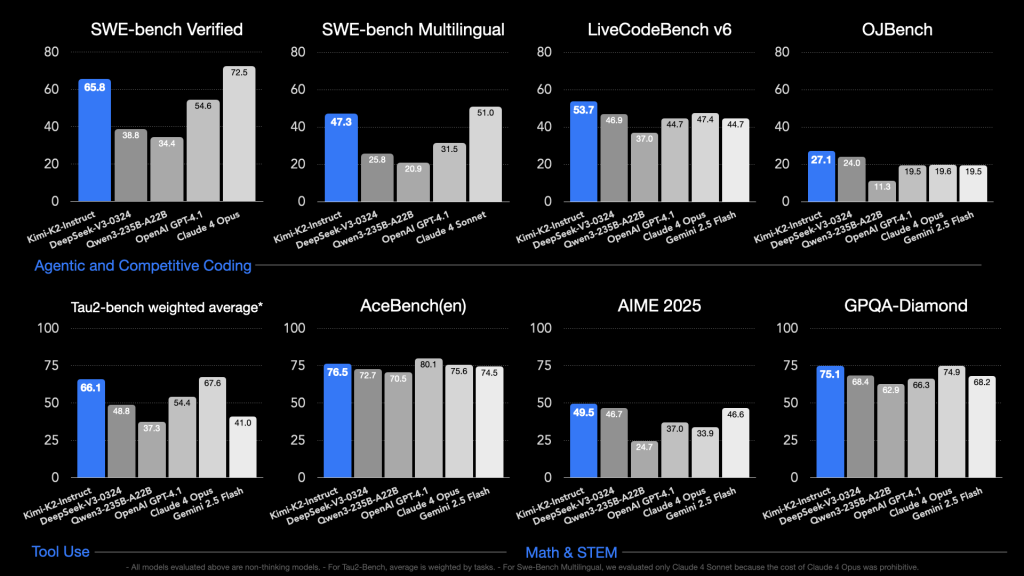
- Code Generation and Debugging: Kimi K2 code generation abilities are state-of-the-art. It was optimized on coding tasks and demonstrates exceptional performance on programming benchmarks. Developers can use Kimi K2 as an AI pair programmer – generating boilerplate code, implementing functions from descriptions, or even writing entire modules. Because of its agentic training, K2 doesn’t stop at simple code suggestions; it can find bugs and fix them, write unit tests, and improve code iteratively. In an IDE integration, Kimi K2 could take a description of a feature and produce working code, then automatically run tests (via tool calling) to verify the code works. This goes beyond typical “code autocomplete” – it’s more like an autonomous coding assistant. Use cases include integrating Kimi into version control or CI systems to suggest patches for bug tickets, performing code reviews (explaining potential issues in a pull request), or even refactoring legacy code with minimal human input. All of this is possible because the model was designed to handle multi-step reasoning and tool use in coding scenarios.
- Long-Document Understanding & Summarization: With a 128K token context window, Kimi K2 can digest very large texts or collections of texts. This unlocks use cases such as summarizing a lengthy technical specification, analyzing a large log file or codebase, or extracting key points from a multi-chapter report. For example, you could feed multiple source code files or a whole markdown documentation into K2 and ask it to generate a summary or answer questions about the content. Moonshot’s own Kimi Chat app allows users to upload files (like PDFs) and have K2 summarize or extract information. Because of the long memory, K2 can maintain context over very extended dialogues or analysis sessions – perfect for long-document summarization tasks that developers or analysts often need. Whether it’s going through thousands of lines of log output to find trends, or reading through a large JSON dataset and providing insights, K2 can handle it in one shot. Its ability to remember conversation history within that large context means you can iteratively dig deeper into a document with follow-up questions without losing the context.
- Multi-step Reasoning and Autonomous Agents: Kimi K2 was explicitly built for agentic behavior – it can break down complex tasks into steps and execute them, including calling external tools or APIs autonomously. For developers, this means you can use K2 as the brain of an AI agent that performs tasks like: querying databases, scheduling events, or orchestrating workflows. For instance, a K2-powered agent could plan a trip itinerary given a budget constraint: it would search for flights and hotels (via tool plugins), compare against the budget, and compile an itinerary – all from one high-level prompt. In a development context, you might have K2 hooked up to your project management and CI tools, so that when you tell it “prepare a release notes draft and deploy version 1.2”, it could fetch commit messages, generate highlights, run deployment scripts, and return a summary of actions taken. Such multi-step reasoning and tool use is enabled by Kimi’s fine-tuned ability to decide when to invoke a function. Using the API’s function calling interface, developers can register functions (e.g., a
get_weather(city)or arun_sql(query)) that K2 can call when needed. Kimi K2 will output a structured call (like a JSON blob with function name and arguments) which your application can execute, then feed the result back – K2 then uses that result to continue its answer. This opens up possibilities for autonomous agents in DevOps, data analysis, customer service (answering queries with database lookups), etc. Kimi K2 essentially blurs the line between a conversational AI and an automation engine, since one model can both converse and take actions. - Multimodal Inputs (Future Potential): Currently, Kimi K2 is a text-only model (it handles natural language and code). Moonshot has hinted at multimodal support (images, audio) on the roadmap, though it’s not available yet. For now, developers might combine K2 with separate vision or audio models if they need to process images or speech. In the near future, however, we may see Kimi K2 handling image inputs or generating descriptions of visual data, which would be a boon for use cases like code generation from a design mockup, or explaining charts and graphs in documents. Even without native multimodal capabilities today, K2’s long context means you can encode images as text (e.g., via OCR or image-to-text descriptions) and feed them in. Moonshot’s focus remains on “agentic” text-based intelligence, but multimodal extensions would further expand what developers can build – such as AI assistants that can see and hear, not just read and write.
In summary, Kimi K2 empowers a wide range of advanced applications: from writing and debugging code, to summarizing massive texts, to powering complex developer tools with Kimi AI at the core.
Early adopters have used it for everything from internal document assistant bots to coding copilots in startup settings.
Its versatility means one model can handle tasks that previously required multiple AI systems wired together. For a developer, this translates to simpler architecture: you can rely on Kimi K2 as a single backbone to both understand user requests and carry out multi-step operations.
Prompt Engineering Best Practices for Kimi K2
To get the most out of Kimi K2, developers should follow some prompt engineering best practices tailored to this model:
- Use a Clear System Prompt: Kimi K2-Instruct has been tuned to follow instructions, but providing a guiding system-level prompt can significantly improve coherence and role adherence. A good default is to set the AI’s role and style in a system message. For example: “You are Kimi, an AI assistant created by Moonshot AI, helpful and knowledgeable.” Moonshot themselves recommend a similar system prompt (“You are Kimi, an AI assistant created by Moonshot AI.”) as a general starter. This gives the model context about its identity and tone. You can modify this prompt to fit your app (e.g. “You are Kimi, an AI coding assistant integrated in a developer tool, specialized in Python.”).
- Optimal Temperature and Parameters: The recommended temperature for Kimi K2 is around 0.6. This was calibrated to balance creativity and determinism given K2’s alignment tuning. In practice, a temperature ~0.6 will yield helpful, coherent responses without too much randomness. You can adjust it slightly up or down depending on your needs (higher for more creative brainstorming, lower for strict factual answers). K2’s API also supports other OpenAI-like parameters such as
max_tokens,top_p, etc. It’s suggested to use a moderatetop_p(e.g. 0.9-1.0) and avoid extremely high temperatures because K2 is already quite expressive. The context window is huge (128K), but be mindful of latency and cost: include only relevant information in the prompt rather than dumping everything. Nonetheless, feel free to take advantage of long context for few-shot learning – you can provide several examples in the prompt if needed without hitting length limits that most models have. - Instruction Formatting: Since Kimi-K2-Instruct is trained for chat and instructions, concise, explicit instructions work best. You don’t need overly wordy prompts; direct language is effective (“Explain how this algorithm works step by step…” or “Find the bug in this code snippet…”). If you want K2 to perform multi-step reasoning, it often does so implicitly, but you can also encourage it via the prompt (for instance, “List the steps you will take and then give the final answer…”). Because K2 can handle multi-turn conversations, you can break a problem into multiple messages: e.g., first ask for an outline, then ask it to fill in details. It will remember the prior context within the same conversation.
- Leverage Tool Use in Prompts: If you plan to use Kimi K2’s tool calling capability, structure your prompts to hint at it. For example, if you’ve enabled a
get_weatherfunction, a user prompt like “What’s the weather in Paris? (You can use the weather tool.)” will lead K2 to invoke the function automatically. The key is providing the list of available tools via the API call (so K2 knows what it can use) and then subtly indicating in the user query that using a tool is appropriate. Kimi K2 will output a function call when it determines one is needed. Ensure your system prompt or instructions allow tool usage (the default system prompt “You are Kimi…” is already tool-capable by design). In general, don’t suppress K2’s agentic abilities – allow it to decide on actions. This may mean avoiding overly restrictive prompts that forbid it from saying “I will do X for you”. Instead, encourage a collaborative tone: e.g., “You have access to the following tools: [Tool A, Tool B]. Use them as needed to help solve the task.” - Handle Long Outputs Carefully: If you expect a very long answer (say, summarizing a 100-page document), consider instructing K2 on formatting the response. You might prompt it to output in sections or bullet points to maintain clarity. K2 can generate extremely long outputs given its training, but for the sake of readers it’s wise to ask for structured results (e.g., “Summarize the document. Begin with an overview, then list key points by chapter.”). Also, you can utilize the
max_tokensparameter to put an upper bound if needed, but 128K context theoretically allows equally large outputs, so it’s mostly constrained by what is practical to read.
By following these practices, developers can achieve optimal results from Kimi K2. In essence, treat K2 similarly to other instructable models but remember it can handle much more context – so provide it with relevant data and clear instructions.
The model’s default style is helpful and concise, thanks to fine-tuning (it won’t ramble on infinitely unless asked), and it has been aligned to avoid unsafe or irrelevant outputs. Still, in professional applications, always review K2’s output especially when it’s executing functions or making critical decisions.
Technical Specs and Performance Highlights
Let’s recap some important technical specifications of Kimi K2 and what they mean for developers in practice:
- Architecture and Scale: Mixture-of-Experts Transformer with 1 Trillion parameters total, 32 Billion active per token. It has 384 experts and selects 8 per token, achieving huge model capacity with sparse computation. In effect, inference speed and memory use are comparable to a dense 30B–40B parameter model even though the model has a trillion weights available. This is a major achievement – you get the benefit of diverse “expert” knowledge without a proportional increase in runtime.
- Context Length: 128,000 tokens (max sequence length). This is orders of magnitude larger than typical 4K or 8K token limits. It enables long conversations or analyzing very large documents in one go. Handling such a context is possible due to Moonshot’s optimized attention (MLA). Latency increases with longer input (since attention is more costly on long sequences), but K2 is optimized to handle it efficiently without crashing.
- Inference Speed & Latency: Thanks to the MoE design, Kimi K2 can achieve near state-of-the-art performance without extreme latency. On proper hardware (e.g., multi-GPU servers or optimized clusters), K2 can generate results in a reasonable timeframe – often on the order of a few tokens per second per GPU, which is similar to other large models. Baseten (an AI infrastructure provider) reported that with their optimized setup, K2’s response latency is low enough for interactive agents. However, on a single “weak” GPU or CPU, throughput will be slow – possibly less than 1 token per second. In practical terms: for hobbyist use on a single high-end GPU, expect that a short response might take several seconds and very long responses could take a few minutes. In a production environment with model parallelism (using multiple GPUs) and optimized inference libraries, K2 can serve API requests with much faster turnaround. Also, streaming output is supported (especially if you use vLLM or Moonshot’s API which streams tokens), so the user can start seeing the answer while it’s being generated, improving perceived latency.
- Memory and Hardware Requirements: The full Kimi K2 model (1T parameters) is enormous in size – roughly 1 TB or more in 16-bit precision. Moonshot uses a compressed Block-FP8 format for storing weights, which significantly reduces disk size and memory overhead, but it’s still a large footprint. Running K2 in full precision realistically requires a multi-GPU setup (e.g., 8×80GB A100 GPUs might just accommodate a sharded model in 16-bit). For developers without access to such hardware, quantization is key. Various quantized versions of K2 exist: for example, a ultra-low precision (approx 1.8-bit per weight) variant brings the requirement down to ~250GB of memory, and a 4-bit quantization is around ~600GB. Moonshot’s community suggests that a baseline setup for minimal usage is 64 GB CPU RAM + a 24 GB GPU (which might run a very reduced version or partial inference) while a more realistic smooth setup is 256 GB RAM + a 48 GB GPU or better. Essentially, to self-host you’ll likely need high-memory machines or multiple GPUs working in parallel. On the bright side, because only 32B parameters are active per token, techniques like memory swapping and lazy loading can be used – not all 1T parameters need to reside in fast memory at once, only the experts being used. Projects like Petals or Sagemaker’s model parallelism could even distribute the model across machines. But for most developers, leveraging cloud providers or Moonshot’s API may be simpler unless you have the infrastructure.
- Throughput and Parallelism: Kimi K2 supports efficient inference parallelism. You can use tensor parallelism (sharding the model across GPUs) and streaming batch generation to get better throughput on multiple concurrent requests. For example, an 8-GPU server could handle several queries to K2 in parallel by distributing expert computations. The model also benefits from a KV-cache (key-value cache) in long contexts – this avoids recomputation of attention for previous tokens, important for speeding up long conversations. Developers should ensure their chosen inference stack leverages caching; Moonshot’s recommended engines like vLLM automatically handle this to keep generation speeds consistent even as outputs grow.
- Memory Usage During Inference: At runtime, K2 will allocate memory for the active experts and the attention layers. Since only 32B parameters are in play per token, memory usage for activations is much lower than a dense 1T model. The main memory consumption is the model weights themselves. If using 8-bit or 4-bit quantization, ensure you have enough CPU memory to load the model (hundreds of GB). If using GPU memory, you might offload some layers to CPU if GPU VRAM is limited (which is possible with frameworks like Accelerate or DeepSpeed). The bottom line: Kimi K2 is heavy but manageable – with planning, it can be run on high-end workstation setups or modest clusters, and in cloud contexts you can rent large-memory instances or GPU pods as needed. For those who cannot meet the requirements, Moonshot’s API or third-party hosted solutions (like OpenRouter, Baseten, etc.) fill the gap by providing access without local hosting.
In summary, the technical profile of Kimi K2 is impressive: it merges the scale of a trillion-parameter model with optimizations that keep it within reach for real-world use.
Developers should weigh the trade-offs between using the hosted API (convenience, lower memory burden) and self-hosting (more control, potential cost savings at scale).
Thanks to its open nature, K2 has also seen rapid improvements and community contributions – expect even better optimized versions and tooling support to emerge over time as the community continues to refine its performance.
Deployment Options: Open-Source Flexibility and Private Hosting
One of the biggest advantages of Kimi K2 is the flexibility in deployment. Moonshot AI’s approach allows developers to choose how to use the model based on their needs, whether through open-source model files or managed services. Here are the primary options:
- 1. Open-Source Model Weights (Self-Hosting): Moonshot has released Kimi K2 under a Modified MIT license, which allows developers to download the model checkpoints and deploy them on their own infrastructure, subject to the terms of the license. For organizations with strict data privacy requirements or those who want to fine-tune the model on proprietary data, this is ideal. You can obtain the weights from Hugging Face or Moonshot’s GitHub – they are provided in an efficient FP8 format to reduce size. From there, you’ll need substantial hardware (as discussed above) or you can use cloud GPU instances to run it. Moonshot’s documentation provides examples for deploying on vLLM or SGLang inference frameworks, which can serve as a starting point. Private hosting gives you full control: you can integrate K2 into your backend, ensure no external API calls (for compliance), and even customize the model (via fine-tuning or prompt templates) to better suit your domain. Many early users have taken this route to embed Kimi K2 in internal tools – for example, a startup might host K2 on their own servers to power an internal coding assistant that has access to the company’s codebase (something they wouldn’t entrust to a third-party API). Keep in mind that self-hosting at this scale requires maintenance of the model environment, but the open model means you’re not locked in to Moonshot’s servers and you can scale usage without per-call fees.
- 2. Moonshot’s Cloud API and Hosted Solutions: For developers who want a plug-and-play experience, Moonshot provides a hosted API platform for Kimi K2. By signing up on the Moonshot platform, you can get API keys to call K2 endpoints similarly to how you’d call OpenAI or Anthropic services. The advantage here is you don’t worry about runtime complexity – Moonshot handles the model serving on their high-performance clusters (likely using optimized GPU pods, possibly even custom hardware or optimizations). The pricing as of 2025 was extremely competitive (on the order of a few dollars per million tokens), making it cost-effective to use even at scale. Additionally, third-party AI infrastructure providers have jumped in to host Kimi K2: for example, Baseten offers K2 on their platform with optimized latency, and other services like Together AI, DeepInfra, and OpenRouter have integrated K2 into their offerings. These platforms often provide service-level agreements (SLAs), usage dashboards, and the ability to deploy in certain geographic regions. For most developers and small teams, starting with the API is the quickest route – it’s just an HTTPS call away to have a trillion-parameter model answering your prompts. You can always transition to self-hosting later if needed (Moonshot’s dual strategy explicitly encourages starting on API, then moving to self-managed if you outgrow it). Using the API also ensures you always have the latest improvements, as Moonshot updates the model (they’ve released updated checkpoints like
Kimi-K2-Instruct-0905with enhancements over time). - 3. Hybrid Approaches and Custom Hosting: Because of K2’s popularity, a community ecosystem is forming. You might not want to host the full model yourself, but you could use a community-run instance or a decentralized approach. Projects are exploring ideas like model-sharing (somewhat akin to torrenting model weights and distributing inference). While these are experimental, it highlights that as an open model, Kimi K2 can be deployed in creative ways – e.g., a consortium of universities could each host part of the model and allow researchers to query it. For most practical purposes, however, you’ll either use Moonshot/partner APIs or run it in your controlled environment.
Regardless of the route, Moonshot actively supports the community through documentation and forums. They have a Discord and are responsive to developer questions. If you run into issues deploying on certain hardware, there’s likely guidance available or someone in the community who has solved it.
The open-source model also means that optimizations (like better quantization, distillation, or improved tool integrations) often come from community contributions. We’ve already seen projects reducing memory requirements and integrating K2 with libraries like LangChain for easier use as an agent.
Private hosting vs API is not an either/or forever – some teams prototype with the API and then transition to a private server for production to eliminate external dependencies. Others might always use the API for convenience.
Moonshot’s strategy has been to make Kimi K2 ubiquitous – use it how you want. And because it’s open, even if Moonshot the company were to pivot, the model would still be available for the community to use and improve.
Conclusion
In conclusion, Kimi K2 represents a significant leap in AI models geared toward developers. It combines an unprecedented trillion-parameter scale with practical features like mixture-of-experts efficiency, a huge context window, and built-in support for tool use.
For developers, Kimi K2 opens up new possibilities: you can integrate a single model that not only chats and answers questions, but also writes code, debugs problems, summarizes massive documents, and orchestrates multi-step tasks. All of this is delivered through an accessible API and an open-source model that you can mold to your needs.
Moonshot’s Kimi K2 stands as a Moonshot AI large language model that is truly developer-centric – emphasizing openness, integration ease, and advanced capabilities that plug right into developer workflows.
If you’re looking to build the next generation of AI-powered applications, Kimi K2 offers a powerful engine to do so. Its API for developers means you can get started in minutes, and its open model means you can deep-dive into custom solutions as you grow.
From Kimi K2 code generation in your IDE to intelligent agents in your cloud, the use cases are vast. This model is a glimpse into the future of AI development: where ultra-large models are not locked behind corporate walls but are tools that any developer can harness.
Moonshot’s Kimi K2 is not just a tech demo – it’s a practical, usable trillion-parameter beast that invites developers to innovate on top of it. The bottom line: Kimi K2 is here, it’s open, and it’s ready to power your next big idea in AI.


