


Kimi-VL is an advanced vision-language AI model developed by Moonshot AI. It seamlessly integrates visual and textual understanding, allowing developers to build applications that can “see” images and “read” text at the same time.
Unlike many large models that require immense compute, Kimi-VL uses a clever Mixture-of-Experts (MoE) design to achieve powerful multimodal reasoning with only 2.8 billion parameters active at inference.
This means Kimi-VL delivers cutting-edge image and text comprehension efficiently, making it an ideal AI image understanding API for developers.
In this article, we’ll explore Kimi-VL’s core capabilities, how to use it via API or chat, advanced use cases, technical insights, and best practices for safe and effective deployment.
Overview of Kimi-VL’s Multimodal Capabilities
Kimi-VL is a vision-language AI model that can handle images, text, and even video frames in a unified way. Developed by Moonshot (as part of their Kimi multimodal AI series), Kimi-VL was built to understand both visual and textual inputs.
It leverages an MoE architecture – essentially many expert subnetworks where only the most relevant ones are activated per query – which allows it to achieve high performance with a fraction of the computing power of larger dense models.
During inference only ~2.8B parameters (of a ~16B total) are used, yet the model still matches or exceeds the capabilities of much larger models on many tasks.
Key features of Kimi-VL include:
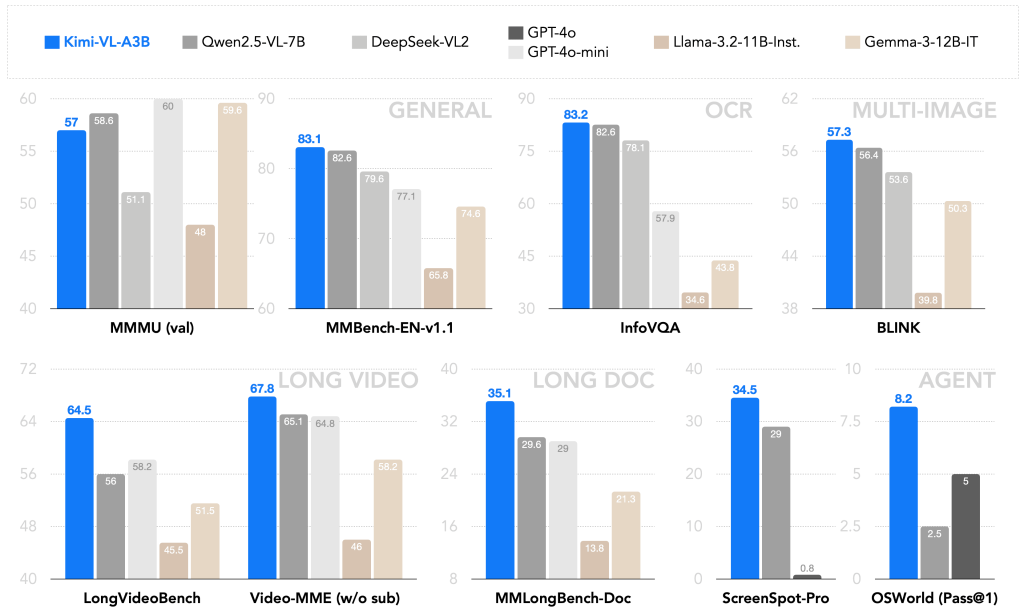
Extended Context Window (128K tokens): The model supports an extremely long context of up to 128,000 tokens. This is orders of magnitude more than typical AI models, enabling Kimi-VL to process lengthy inputs like entire documents, books, or long transcripts without needing to truncate or split them. It scored impressively on benchmarks for long videos and long documents, demonstrating strong understanding even with very large inputs.
Multimodal Input Handling: Kimi-VL accepts visual inputs alongside text, using a dedicated high-resolution vision encoder (called MoonViT) to process images in their native form. It can take single images, multiple images, and even video frame sequences as input (after some preprocessing for videos). This means you can feed it a picture (or several) plus a question or prompt, and it will reason over both the visual and textual information together.
Advanced Visual Reasoning: Thanks to MoonViT, Kimi-VL can interpret images without downsampling them into tiny patches or tiling large images. It handles high-resolution inputs up to about 1792×1792 pixels (over 3.2 million pixels) in one go. This capability allows it to analyze detailed diagrams, dense charts, infographics, or full UI screenshots without missing small details or text. In fact, it achieved state-of-the-art performance on info-rich visual benchmarks like InfoVQA (visual QA on infographics) and ScreenSpot (UI understanding).
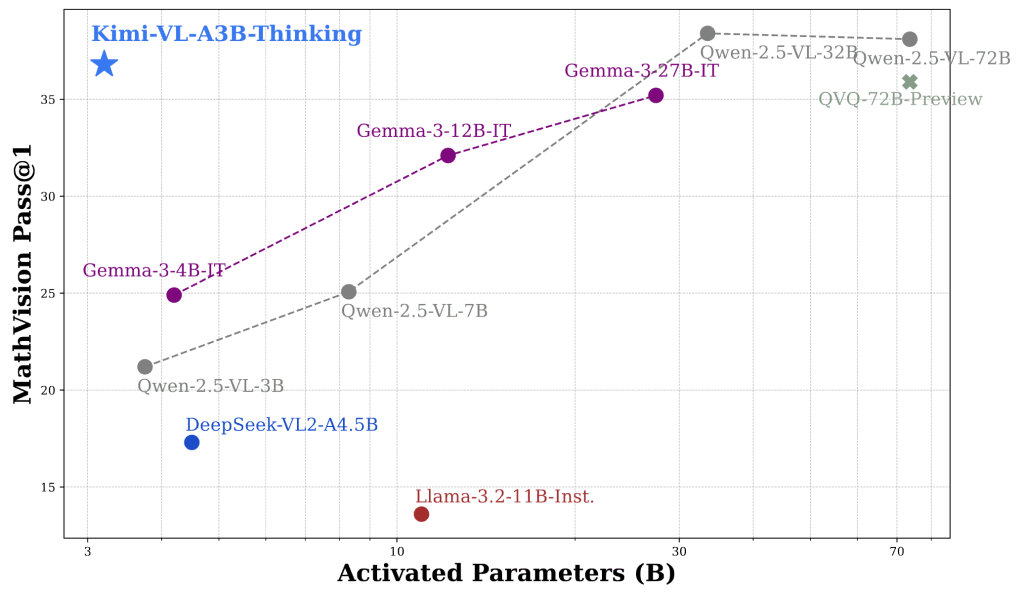
Strong Textual and Logical Reasoning: The language side of Kimi-VL is based on Moonshot’s Moonlight LLM, trained on trillions of tokens of text. It has been instruction-tuned for conversation and further refined with chain-of-thought reasoning. A special variant, Kimi-VL-Thinking, was fine-tuned with long step-by-step reasoning and reinforcement learning to excel at complex problem solving. For example, Kimi-VL-Thinking achieves high scores on math reasoning benchmarks (e.g. MathVision) despite its compact size. For most general perception and Q&A tasks, the standard Kimi-VL-A3B-Instruct model is recommended, while the Thinking variant is there for advanced reasoning like math puzzles.
The chart below shows how the Kimi-VL-A3B-Thinking variant leads the MathVision benchmark, outperforming larger multimodal models in reasoning accuracy.
Agent Abilities: Beyond one-shot Q&A, Kimi-VL can operate in a multi-turn agent mode. It can follow multi-step instructions and even interact with graphical interfaces conceptually. In Moonshot’s tests, Kimi-VL was able to interpret software UIs and perform actions like navigating a browser menu or adjusting settings, effectively acting as a visual assistant. This opens the door for developers to create AI agents that can analyze what’s on screen and make decisions or explanations based on it.
In summary, Kimi-VL for developers offers a powerful multimodal AI toolkit: it can see, read, and reason – all within a single model. It’s open-source (MIT licensed), meaning you can integrate it freely into your applications. Next, we’ll dive into how Kimi-VL processes different inputs and how you can interact with it via APIs or chat interfaces.
The following benchmarks highlight Kimi-VL’s strong multimodal performance compared to leading vision-language models:
Processing Visual and Text Inputs in Kimi-VL
Architecture of Kimi-VL: The model combines a MoonViT visual encoder (left) that processes images at native resolution, with a Mixture-of-Experts language decoder (right).
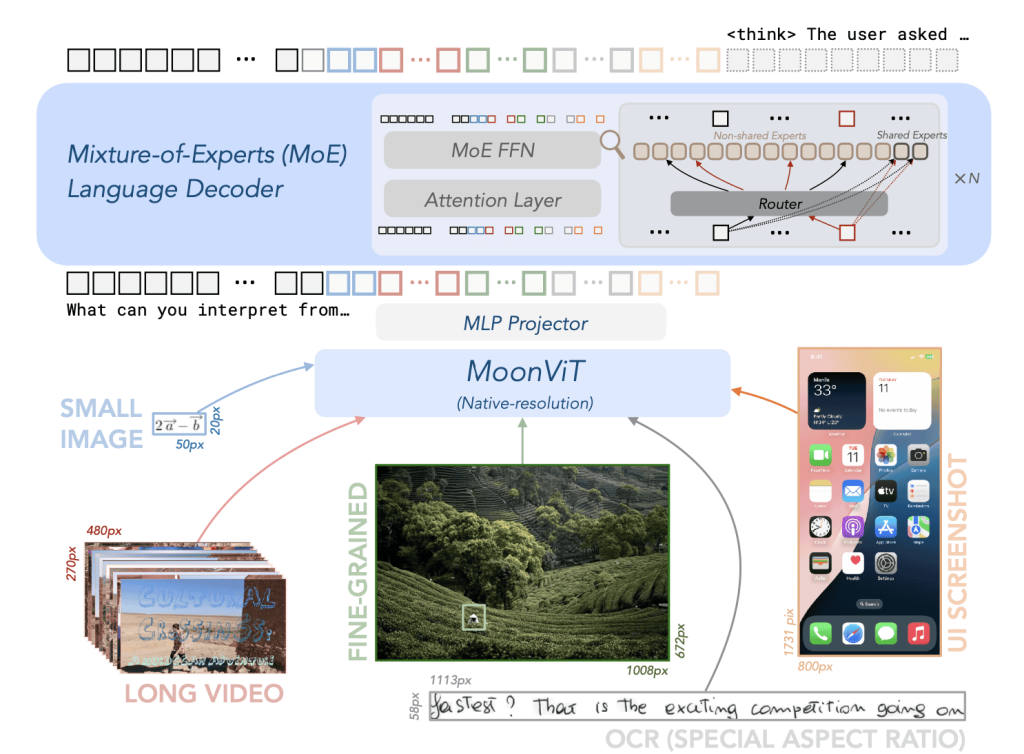
Visual inputs (e.g. photographs, charts, UI screenshots, video frames, or handwritten notes) are encoded into embeddings that the language model can interpret alongside text tokens. Only a subset of expert parameters are activated for any given token, making inference efficient.
Visual inputs: Kimi-VL is designed to handle a wide range of image types and visual formats without special preprocessing.
You can feed in common image files (e.g. PNG, JPEG) containing things like photographs, diagrams, charts, forms, screenshots, or even handwriting, and the model will incorporate that visual information into its reasoning.
MoonViT, the vision transformer backbone, works on the full image resolution, preserving small text and details. This means Kimi-VL can analyze complete screenshots or complex graphics without splitting them into pieces.
For example, if given a full webpage screenshot or a detailed infographic, it can interpret it holistically – whereas some other systems might require tiling the image or would miss fine print. Kimi-VL also handles handwritten notes and scanned documents using built-in OCR capabilities.
In one demonstration, it was able to read a scanned historic manuscript, identify references to Albert Einstein, and explain their significance.
Text inputs: Alongside images, Kimi-VL accepts natural language text (prompts, questions, or documents). It can take a user’s question about an image, a prompt containing both an image and text, or multi-turn dialogue.
The model’s language decoder will consider textual context just like any large language model, and combine it with visual context from images. Notably, Kimi-VL supports extremely long text inputs – up to 128k tokens.
This means you could provide the model with the extracted text of a lengthy PDF or a large HTML page (or multiple documents), possibly along with relevant images, and Kimi-VL can reason over all of it together.
For instance, you could input an entire research paper’s text plus its figures (as images) in one shot, and ask the model to summarize or answer questions about the content. Such long-context, multimodal processing is a standout feature of Kimi-VL.
Multiple and mixed inputs: You are not limited to one image at a time – Kimi-VL can handle multiple images in a single query (currently up to 8 images per prompt by default). The images could be related (e.g. successive pages of a document, or different views of an object) or disparate.
The model will attend to all provided visuals and the text jointly. There is no direct video file input, but you can break video into frame images and feed those (the model has been evaluated on video understanding tasks by sampling frames).
All inputs – whether one image and text, or many images and text – get fused in the model’s multimodal transformer, allowing for rich visual-textual reasoning.
This enables use cases like comparing two images, answering a question that requires referencing both an image and a passage of text, or analyzing a sequence of images (like steps in a process).
Using Kimi-VL via API and Chat Interface
One of the goals of Kimi-VL is to be developer-friendly. Because it’s open-source and based on standard transformer architectures, you have multiple options to use it: via public APIs, through libraries like Hugging Face Transformers, or in a web-based chat interface. Here’s how you can get started:
API Integration and Python Usage
The easiest way for developers to try Kimi-VL is by using the Hugging Face Transformers library or an API endpoint. Moonshot AI has released the model weights on Hugging Face Hub, and thanks to custom integration code, you can load the model and a processor that handles image+text input formatting.
Under the hood, Kimi-VL uses a chat-style message format (with roles and content) that is compatible with OpenAI’s chat API schema. This means you can integrate Kimi-VL in a similar way to how you would use an OpenAI GPT model – providing a list of messages including images and text – and it will produce a completion.
For example, using Python and Transformers:
from transformers import AutoProcessor, AutoModelForCausalLM
from PIL import Image

model_name = "moonshotai/Kimi-VL-A3B-Instruct"
model = AutoModelForCausalLM.from_pretrained(model_name, device_map="auto", torch_dtype="auto", trust_remote_code=True)
processor = AutoProcessor.from_pretrained(model_name, trust_remote_code=True)

# Load an image (e.g., a chart or form scan)
image = Image.open("sample_form.png")
prompt_text = "Extract the key values from this form and list them."

# Prepare inputs for the model: combine image + text prompt
inputs = processor(images=image, text=prompt_text, return_tensors="pt").to(model.device)
outputs = model.generate(**inputs, max_new_tokens=200)
result = processor.batch_decode(outputs, skip_special_tokens=True)[0]
print(result)
In this snippet, we load the Kimi-VL Instruct model and its processor. We open an image (sample_form.png) and define a text prompt asking the model to extract values from the form.
The processor helps format the image and text into the model’s expected input form. We then generate a response, limiting to 200 new tokens, and decode the result to get the answer string.
Under the hood, the processor is inserting special tokens and placeholders so the model knows an image is attached (similar to how you’d include <image> tokens in some multimodal models). The output might be a list of extracted field values from the form in this case.
If you prefer an API service instead of running the model locally, you can use Moonshot’s deployment on OpenRouter or other AI platforms. For instance, on OpenRouter (which provides an OpenAI-compatible REST API), Kimi-VL is offered as a model you can query.
You would send a JSON request with a "model" name (e.g. "moonshotai/kimi-vl-a3b-instruct"), your prompt message, and include the image (often as a URL or base64 data, depending on the API).
The response will contain the model’s answer. Because Kimi-VL uses a chat format, you send messages like in ChatGPT’s API, but with an extra step to include image data. For example, a JSON payload might look like:
{
"model": "moonshotai/kimi-vl-a3b-instruct",
"messages": [
{"role": "user", "content": " What does this image show?"}
]
}
(The exact format for images in the API may vary; some services use a separate field or attachment for images rather than inline as shown. The key idea is you provide the image content and any accompanying text in one request.)
Besides OpenRouter, you could also host Kimi-VL yourself behind an API. The model’s GitHub provides an OpenAI-compatible server implementation, meaning you can run a local service that accepts the same API calls as OpenAI’s API but uses Kimi-VL on the backend.
This is great for developers who want to integrate Kimi-VL into applications with minimal code changes if they’re already using ChatGPT or similar.
Chat Interface and Interactive Use
For quick experiments and debugging, you can use a chat interface with Kimi-VL. Moonshot AI has a web demo (for example, a Hugging Face Space or their own Kimi chat app) where you can interact with Kimi-VL by typing messages and uploading images.
On the Hugging Face model page, there is a “Chat Web” or demo link which opens an interface to chat with Kimi-VL. Using the chat UI, you can simply drag-and-drop an image or provide an image URL, ask a question about it, and see Kimi-VL’s response in a conversational format.
This interactive mode is very useful to test the model’s visual reasoning quickly. For instance, you could upload a screenshot of a webpage and ask “What is highlighted on this page?” or paste a graph image and ask “Describe the trend shown in this graph.”
The chat interface handles the input formatting for you (adding the image to the prompt) and displays the answer. Developers can use this to prototype ideas before coding against the API.
Because Kimi-VL uses a chat-style prompt format internally, you can also have multi-turn conversations mixing text and images. For example, you might first ask it to interpret an image, then follow-up with another question referring to that image or asking it to clarify something.
The model will use the dialogue history (within that huge 128k context window) to maintain context across turns. This can be harnessed in applications where a user might incrementally query an image or a series of images.
Tip: When using the Thinking variant of Kimi-VL, you may want to allow a more verbose reasoning style. The authors suggest using a slightly higher temperature (around 0.8) for that model to encourage creative, step-by-step answers.
The Instruct variant, on the other hand, is tuned to be more straightforward (temperature ~0.2 for deterministic answers).
In practice, you can choose which variant to call via the model name in the API or the weight loading (Kimi-VL-A3B-Instruct vs Kimi-VL-A3B-Thinking). Both understand images; they just differ in how they respond (concise vs. more analytical).
Advanced Use Cases of Kimi-VL
Kimi-VL opens up a variety of advanced use cases for developers building multimodal applications. Here are some key scenarios where Kimi-VL shines, along with what you can achieve:
- Reading and Extracting Data from Forms and Scanned Documents: With its integrated OCR capability, Kimi-VL can serve as an intelligent document processing tool. Developers can feed images of forms, receipts, invoices, or ID documents and have Kimi-VL read the text and extract key information. For example, given a scanned registration form, Kimi-VL could output the filled name, date, and other fields. It excels at general document understanding tasks, combining text recognition with comprehension. This can automate data entry and analysis pipelines – think of processing dozens of scanned PDFs by asking Kimi-VL questions about them or instructing it to output structured data.
- Analyzing Charts and Tables in Reports: Kimi-VL can interpret visual elements like charts, graphs, and tables embedded in research papers or business reports. Because it sees the image content and underlying text, you could ask it to summarize the information in a chart or compare data points. It was specifically tested on info-dense visuals and performed strongly (scoring 83.2 on an information-oriented visual QA benchmark). For developers, this means you can build tools where a user uploads a chart image (say, a sales graph from a PDF) and asks questions like “What was the peak sales month and value?” – Kimi-VL will parse the axes, legends, and data patterns from the chart image and provide an answer or summary.
- Visual Question Answering (Image-Based QA): Kimi-VL can answer free-form questions about images. This covers everything from identifying objects or scenes in a photo, to explaining what’s happening in an image, to reading text within an image. You can present an image and ask things like “What is this device used for?” or “How many people are in this picture and what are they doing?” and get a meaningful answer. The model’s robust visual understanding and reasoning abilities allow it to handle even complex, high-level questions about an image’s content. This capability can power features in educational apps (e.g. ask a question about a diagram), accessibility tools (describing images for visually impaired users), or general-purpose visual assistants.
- Explaining or Summarizing UI Screenshots and Infographics: One particularly novel use case is feeding Kimi-VL a screenshot of a software user interface or a multi-step infographic and having it explain what’s shown or walk the user through it. Kimi-VL can interpret GUI components – menus, buttons, dialog boxes – and has even demonstrated the ability to guide a user through tasks by reading a screenshot. For instance, if you capture a screenshot of a settings window, you can ask “How do I enable dark mode in this interface?” and Kimi-VL might respond with step-by-step instructions referring to the screenshot content. This was showcased with a “Do Not Track” Chrome settings guide where Kimi-VL described each step depicted. Developers could use this in helpdesk automation, software tutorials, or digital customer support, where a user’s screenshot is analyzed to provide assistance. Similarly, for infographics (which mix graphics and text to explain concepts), Kimi-VL can summarize the key points or answer questions about them, since it can parse both the visual diagram and any text labels.
- Debugging Code Screenshots or Solving Handwritten Math Problems: Since Kimi-VL can read text from images and has a powerful language model, it can even assist in niche but handy scenarios like reading code or math from an image. Imagine a developer gets an error message on a screen or a snippet of code that’s hard to copy; they can screenshot it and ask Kimi-VL for help. The model will OCR the code or error text and leverage its training (which includes programming and logic knowledge from the underlying LLM) to explain the issue or suggest a fix. While Kimi-VL may not always perfectly solve complex coding problems, it can definitely parse the text and give insights (for example, identifying a Python traceback in a screenshot and summarizing the error). Likewise, for math education, one could snap a picture of a handwritten equation or a geometry diagram and ask Kimi-VL to solve the problem or show the steps. The model’s ability to handle mathematical reasoning on images (it scored ~37% on a challenging MathVision image benchmark) indicates it can tackle many math questions presented visually.
Each of these use cases can be implemented via the Kimi-VL API or by embedding the model in your application.
Importantly, these scenarios show how “Kimi AI with images” can be brought to life: developers are not limited to text prompts, they can build features where users provide images or screenshots and get intelligent results.
Whether it’s an app that scans documents and answers questions, a chatbot that can see what the user sees, or a tool that analyzes research figures, Kimi-VL provides the multimodal AI backbone to make it possible.
Prompt Design, Performance, and System Considerations
When working with Kimi-VL, there are some technical insights and best practices to keep in mind to get the most out of the model:
Prompt Structure for Visual Inputs
Formulating prompts for Kimi-VL involves specifying both the image(s) and any accompanying text query or instructions. If you’re using the Hugging Face AutoProcessor, as shown earlier, it abstracts a lot of this by letting you pass images= and text=.
Underneath, the processor is creating a special token sequence that the model expects. Kimi-VL’s prompt format is chat-based: it uses role identifiers (like “user” and “assistant”) and marks images with a placeholder token in the text. In plain terms, you can imagine the model sees something like:
User: <Image> What does this image show?
Assistant: ...
The actual implementation uses a JSON-like message format, but you typically don’t need to manually write that out. Just know that the first message from the user can contain an image and text together, and the model will treat the image as if it’s appended to the text prompt at that position.
If providing multiple images, the order you list them will be the order they are “seen” by the model. It can be helpful to explicitly prompt the model on how to use the image, especially if your task is specific (e.g. “Using the image above, answer the following…”).
Kimi-VL has been tuned to handle instructions like “Think step by step” or “Explain your reasoning” as well, which can be useful for complex queries. You can include such phrases in the text part of your prompt to guide the model’s response style.
One crucial detail: images themselves do not count against the token limit in the same way text does. They are processed by the vision encoder into embeddings. The 128k token limit mainly applies to text tokens (including textual descriptions of images if they were embedded, but here they’re not).
So you can include large images or many images without worrying about “token” count from the images – worry more about the total text length of your prompt and expected answer. Still, if you include dozens of images, there may be a practical limit (the processor currently allows 8 by default, which is plenty for most use cases).
Token Handling and Long-Context Performance
With a 128,000 token context window, Kimi-VL can ingest a huge amount of information. In practical terms, 128k tokens is roughly 100k words of text (depending on tokenization) – about the length of a novel.
While the model can handle this, feeding extremely long contexts will slow down inference and consume significant memory. The Kimi-VL architecture uses specialized positional encodings and attention optimizations to make this feasible, but developers should still use the long context wisely.
If you only have a short question about an image, you don’t need to pad in extra context. But if you do need to give it, say, an entire codebase log or a book chapter along with an image, Kimi-VL can do it – just expect longer generation times as it processes all that content.
One way to leverage the long context is multi-turn sessions: you can feed the model a lot of background info in the initial system or user messages (like a long document text), then ask several questions about it (possibly even adding different images for different questions) all in one session.
The model will “remember” earlier parts of the conversation within that token window. Developers can thus avoid re-sending the same context for every query, which is efficient.
Keep in mind that extremely long inputs might still face some performance challenges; Moonshot’s report notes that even with 128k context capacity, very long sequences can be technically challenging, so monitor for any truncation or weird behavior if you truly push the limit.
Latency and Performance Tips
Kimi-VL’s efficient design (2.8B active parameters) makes it relatively fast and lightweight compared to many multimodal models. In fact, it’s described as “GPU-friendly” because it uses much less compute per token than a dense 16B model would.
Many developers have successfully run Kimi-VL on a single modern GPU. That said, to achieve the best performance, consider the following:
- Use FlashAttention: The model supports FlashAttention v2, which is a faster implementation of transformer attention that can significantly speed up inference and reduce memory usage for long sequences. If you install the
flash-attnlibrary and enable it (as shown in the example code comments by settingattn_implementation="flash_attention_2"), you’ll likely see improved throughput, especially for large context or multiple image inputs. This is highly recommended for production setups. - Choose the Right Variant: If your use case doesn’t require lengthy step-by-step reasoning, the Instruct variant will generally be faster and more deterministic (due to lower recommended temperature and simpler reasoning). The Thinking variant might take a bit more time per query because it tends to generate longer, more complex outputs (it’s literally doing more “thinking”). So use the model variant that fits the task to avoid unnecessary latency. For instance, for a quick form data extraction, Instruct is sufficient. For a complicated puzzle or math proof, Thinking might be worth the extra time.
- Batch and Stream if Possible: If you have multiple image queries, you can batch them since the model can process multiple images/text pairs together (the processor and model both support batching). Also, because of the large context, you might allow the model to stream output if using an API that supports it. This way the user can start reading the answer before the model has finished generating the full 1000-token explanation, for example. When running locally with Hugging Face, you can use generate in a loop or use libraries like vLLM which support continuous streaming generation.
- Memory Footprint: The full model is 16B parameters (in memory, that’s ~32 GB in FP16), but remember only 3B are active at a time. This means if you use GPU memory paging or quantization, you can run Kimi-VL on surprisingly modest hardware. Many have run it in 8-bit or 4-bit quantized mode to reduce VRAM needs. For full precision and full context, a GPU with 24GB VRAM is recommended. This ensures even a maxed-out 128k token run with multiple images can be handled. If you don’t plan to hit those extremes, a 16GB GPU should handle typical workloads (and possibly even 12GB with some optimization). The model is available in BF16 half-precision by default, and using that or FP16 is advisable to save memory. If you’re constrained, consider using the quantized versions or running on a machine with multiple GPUs (the Hugging Face
device_map="auto"will shard the model layers across available GPUs if needed). - Dependency Versions: To avoid any compatibility issues, use a fairly recent PyTorch (>=2.1) and Transformers library (the authors mention 4.48 or above, and the latest versions are likely fine). The model uses some custom code (hence
trust_remote_code=Truein the loading functions), which means your environment should allow that and have internet access when loading (to fetch the custom model architecture). EnsurePillowor a similar imaging library is installed to handle images, andtorchvisionif you plan to do any image transforms.
System Requirements and Deployment
To deploy Kimi-VL in a real application, weigh your options: cloud vs local, and GPU vs CPU. Running on CPU only is possible but will be extremely slow (since 3B active params and a hefty vision transformer are a lot for a CPU to handle). For practical purposes, plan for a GPU in your stack.
On the cloud, services like Hugging Face Inference Endpoints or Replicate offer on-demand GPU instances with Kimi-VL (Replicate’s profile suggests using their large GPU instances for full 128K context tasks). Locally, if you have a gaming GPU or better, you might integrate Kimi-VL into your app or backend.
One interesting deployment path is using vLLM – an open-source inference engine optimized for serving large language models efficiently.
The Kimi team has provided integration with vLLM, meaning you can spin up a vLLM server with Kimi-VL and get high-throughput, low-latency handling of prompts (vLLM is known for its continuous batching and fast context-switching). This is great for serving multiple user requests concurrently with minimal overhead.
Also note that Kimi-VL is fully open-source, so you can fine-tune it if needed for your domain. The authors have enabled LoRA fine-tuning on a single GPU (~50GB VRAM for full fine-tune, or smaller for LoRA).
If you have specialized data (maybe industrial documents or specific chart types), you can adapt the model and still use it under the permissive MIT license. This flexibility is a big plus for enterprise developers who might need custom models but starting from Kimi-VL’s multimodal base.
To summarize the technical considerations: Kimi-VL is developer-ready, but make sure to craft your prompts properly (images + text), use hardware acceleration (GPU, FlashAttention), and mind the large context capabilities so you use them when it truly adds value.
With those in place, you can expect a smooth experience integrating this Moonshot Kimi multimodal AI model into your projects.
Privacy, Safety, and Responsible AI Usage
When deploying a powerful model like Kimi-VL that can see and read images, it’s important to address privacy and safety:
- Data Privacy: Visual inputs often contain sensitive information – e.g. photographs of people, scans of personal documents, or proprietary charts. As a developer, ensure that images sent to Kimi-VL are handled securely. If using a cloud API (like a third-party service), be aware that the image data is transmitted to that service; you should use encryption (HTTPS, etc.) and consider user consent. For highly sensitive data (medical forms, IDs), you might opt to run Kimi-VL locally or on a private server to avoid exposing images externally. Kimi-VL itself does not store data persistently, but any server or API handling it could log requests, so follow best practices (e.g. disable logging of raw images, or blur/redact sensitive parts if not needed).
- Output Accuracy and Verification: Kimi-VL will do its best to interpret images and text, but it’s not infallible. It might occasionally misread a blurry word or misidentify an object, and the language model could hallucinate an answer that sounds confident but is incorrect. Developers should implement verification steps for critical use cases. For instance, if using it to extract numbers from a financial document, double-check the output or have a secondary validation (even simple heuristics) to ensure those numbers make sense. For question-answering scenarios, consider providing sources or highlighting parts of the image/text that support the answer, so users trust but verify. Kimi-VL’s multimodal reasoning is advanced, but as with any AI, garbage in, garbage out – unclear images or overly complex prompts could yield less reliable results.
- Content Safety: Since Kimi-VL can process images, it may encounter potentially sensitive or harmful content (e.g. violent imagery, explicit content, or hateful symbols). The base model might describe what it sees without judgement. It’s up to the developer to filter or handle such cases appropriately. You might need to integrate an image moderation API to screen inputs before they go to Kimi-VL (for example, to block overtly inappropriate content). On the text side, Kimi-VL doesn’t have the strict guardrails that some proprietary models do, so it may not always refuse unsafe requests. Moonshot’s benchmarks included an “OSWorld-G full set with refusal” which suggests the model can refuse certain requests, but you should not rely on it to self-censor in every scenario. Implement usage policies in your application: for example, do not allow generation of disallowed content via image prompts (like asking it to read violent extremist texts from an image). Always test the model’s behavior with edge-case inputs relevant to your domain and add necessary filters.
- Responsible Deployment: In user-facing applications, transparency is key. If your app answers questions about images using Kimi-VL, consider informing users that an AI model is generating the responses (especially if there’s any uncertainty in them). Encourage users to use the feature for good purposes – e.g. assistive help, education, productivity – and discourage malicious uses (like attempting to identify individuals in images, which not only might be inaccurate but could violate privacy norms). Kimi-VL is not designed for facial recognition or surveillance, and its training would not guarantee accurate identification of people. It’s better suited to descriptive and analytical tasks. Respect copyright as well: if an image has copyrighted material (like a chart from a paywalled report), ensure that using Kimi-VL to summarize it falls under fair use or required permissions, similar to how you would if a person did the task.
Finally, since Kimi-VL is open-source, any improvements or issues you find can be fed back to the community. Moonshot AI actively updated the model (as seen with the 2506 Thinking version) to improve its capabilities.
Being responsible also means staying updated – keep an eye on new releases or patches (e.g. fixes that improve reliability or security).
By using the model conscientiously and keeping users’ trust in mind, developers can harness “Kimi-VL for developers” as a force for good: enabling applications that understand our visual world while respecting the people in it.
Conclusion
Kimi-VL represents a significant step forward in making multimodal AI accessible to developers. It combines the skills of computer vision and natural language understanding in one lightweight package, allowing you to build rich applications that can interpret images and text together.
We’ve seen how Kimi-VL’s vision-language capabilities — from reading documents and analyzing charts to engaging in visual QA and UI navigation — open up endless possibilities for innovation.
With easy integration via APIs or libraries, and an open-source license to boot, Kimi-VL is positioned as a go-to AI image understanding API for anyone looking to add intelligent vision features to their software.
As you explore Kimi-VL, remember to leverage its strengths (like that long context and high-res image handling) and plan around its demands (ensuring you have the compute to serve it, and guardrails for safe use). The future of developer tools is increasingly multimodal, and Kimi-VL gives you a powerful head start.
Whether you’re developing a document assistant, a visually-aware chatbot, or a data analysis tool, Kimi-VL can be the Moonshot Kimi multimodal AI partner in your project — seeing the world as you do, and making sense of it through language.


